Moodle/Update: Unterschied zwischen den Versionen
Aus Foxwiki
K Textersetzung - „800px“ durch „600px“ |
|||
| (2 dazwischenliegende Versionen desselben Benutzers werden nicht angezeigt) | |||
| Zeile 93: | Zeile 93: | ||
=== Erweiterungen aktualisieren === | === Erweiterungen aktualisieren === | ||
<syntaxhighlight lang="bash" highlight="1- | <syntaxhighlight lang="bash" highlight="1-11" line copy> | ||
cp -a moodle.bak/mod/cardbox moodle/mod | cp -ai moodle.bak/config.php moodle/ | ||
cp -a moodle.bak/blocks/featuredcourses moodle/blocks | cp -a ./moodle.bak/public/mod/cardbox ./moodle/public/mod/ | ||
cp -a moodle.bak/ | cp -a ./moodle.bak/public/blocks/featuredcourses ./moodle/public/blocks/ | ||
cp -a moodle.bak/question/type/multichoiceset moodle/question/type/ | cp -a moodle.bak/public/blocks/sharing_cart moodle/public/blocks/ | ||
cp -a ./moodle.bak/public/question/type/multichoiceset ./moodle/public/question/type/ | |||
cp -a ./moodle.bak/public/course/format/tiles ./moodle/public/course/format/ | |||
cp -a ./moodle.bak/public/auth/oidc ./moodle/public/auth/ | |||
cp -a ./moodle.bak/public/theme/stream ./moodle/public/theme/ | |||
chown -Rc web6:client1 moodle | |||
cd moodle | |||
sudo -u web6 composer install --no-dev --classmap-authoritative | |||
</syntaxhighlight> | </syntaxhighlight> | ||
; Status prüfen | |||
https://seminare.foxtom.de/admin/plugins.php | https://seminare.foxtom.de/admin/plugins.php | ||
Aktuelle Version vom 7. November 2026, 13:17 Uhr
Moodle/Update - Software-Aktualisierung
Vorbereitung
Version
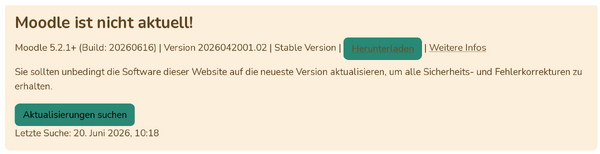
Aktuelle und neue Version ermitteln
https://seminare.foxtom.de/admin/index.php
Verzeichnisstruktur
tree -d -L 2
├── backup
└── web
    └── moodle
Konfiguration auslesen
grep '$CFG->db' moodle/config.php
$CFG->dbname  = 'dbname';
$CFG->dbuser  = 'dbuser';
$CFG->dbpass  = 'dbpass';
export dbname='dbname'
export dbuser='dbuser'
export dbpass='dbpass'
Datensicherung
Datenbank
mysqldump --user="$dbuser" --password="$dbpass" $dbname | gzip > ../backup/"$dbname"_$(date -I).sql.gz
- Kontrolle
zless ../backup/"$dbname"_$(date -I).sql.gz
Dateisystem
tar -czf ../backup/moodle_$(date -I).tar.gz moodle
- Kontrolle
tar -tvf ../backup/moodle_$(date -I).tar.gz moodle
Durchführung
Verzeichnis umbenennen
mv moodle moodle.bak
Download
wget https://download.moodle.org/download.php/direct/stable502/moodle-latest-502.zip
Archiv entpacken
unzip moodle-latest-502.zip
Zugriffsrechte korrigieren
sudo chown -Rc web76:client1 moodle
Erweiterungen aktualisieren
 cp -ai moodle.bak/config.php moodle/
 cp -a ./moodle.bak/public/mod/cardbox ./moodle/public/mod/
 cp -a ./moodle.bak/public/blocks/featuredcourses ./moodle/public/blocks/
 cp -a moodle.bak/public/blocks/sharing_cart moodle/public/blocks/
 cp -a ./moodle.bak/public/question/type/multichoiceset ./moodle/public/question/type/
 cp -a ./moodle.bak/public/course/format/tiles ./moodle/public/course/format/
 cp -a ./moodle.bak/public/auth/oidc ./moodle/public/auth/
 cp -a ./moodle.bak/public/theme/stream ./moodle/public/theme/
 chown -Rc web6:client1 moodle
 cd moodle
 sudo -u web6 composer install --no-dev --classmap-authoritative
- Status prüfen
https://seminare.foxtom.de/admin/plugins.php


Anhang
Siehe auch
Dokumentation
Links
Projekt
Weblinks
